
The problem
Prior to this project, customers had no ability to choose or manage substitutions. When an item was unavailable, it was automatically replaced during picking, and customers only discovered the substitution once the order arrived at their door — at which point they could accept or reject it.
This created frustration and eroded trust, particularly when substitutions did not match customer preferences or needs.
Customer impact
In the existing experience, customers were only informed about substitutions at the point of dispatch, after their order had already been picked. At that stage, customers had no opportunity to influence the outcome, even though internal research consistently showed that lack of control over substitutions was one of the biggest pain points in online grocery.
While item-level fulfilment metrics appeared extremely strong (e.g. substitution rate of 0.72% and short rate of 0.20%), these numbers masked the real customer-level impact. With an average basket size of 43.7 items, these seemingly low rates translated into:
- ~20% of orders containing at least one substitution
- ~9% of orders containing at least one short
This meant that a significant proportion of customers were regularly experiencing unexpected changes to their orders, with no ability to prevent or prepare for them.
Business impact
From a commercial perspective, item-level unfulfilment is the critical unit of analysis because each substitution or short corresponds directly to lost revenue (for shorts and rejected subs) or increased operational cost (through handling, waste or doorstep friction).
Across OSP Ecom Partners (52 weeks to 1 Nov 2025):
| ITEM | ORL | Other Ecom Partners | Total |
|---|---|---|---|
| Substitutions | 14,343,029 | 23,184,825 | 37,527,854 |
| Shorts | 8,048,065 | 10,317,966 | 18,366,031 |
| Rejected Subs | 1,778,536 | 3,277,395 | 5,055,930 |
| REVENUE IMPACT | |||
| Shorts Revenue Loss | £22,454,101 | £23,688,836 | £46,142,937 |
| Rejected Subs Revenue Loss | £4,962,114 | £7,524,513 | £12,486,627 |
| OPEX IMPACT | |||
| Rejected Subs | £3,473,480 | £5,267,159 | £8,740,639 |
Annualised financial implications:
- £46.1M revenue lost from shorts
- £12.5M revenue lost from rejected subs
- £8.7M in Opex (product waste – purge) from rejected subs
In total, this represents ~£58.6M in missed revenue and ~£8.7M in operational costs annually across OSP Ecom Partners.
My rol
I led the end-to-end UX design for the Substitutions project over a six-month period.
This included:
- Driving discovery and problem definition in collaboration with product and operations
- Contributing to user research and interviews, and translating insights into design principles
- Leading design exploration and solution definition across web, app and webapp
- Owning design decisions and alignment across stakeholders
- Delivering handoff to engineering and supporting implementation through launch
I worked closely with logistics and fulfilment teams to ensure the experience was operationally feasible and scalable.
Key constrains and complexity
Designing a better substitutions experience required close coordination with logistics and fulfilment teams. The solution needed to work within several operational constraints:
- Defined cut-off times, after which changes could no longer be actioned by the CFC
- Notification timing that allowed customers to respond while still giving fulfilment teams time to react
- Predictive accuracy around which products were likely to become unavailable
- Stock availability of potential substitute items
The challenge was to give customers meaningful control without introducing operational risk or negatively impacting fulfilment efficiency.
UX strategy
The goal of this project was to shift substitutions from a reactive, post-fulfilment experience to a proactive decision moment within the basket, giving customers meaningful control while respecting operational and logistics constraints.
The strategy focused on:
- Enabling customers to influence outcomes before picking begins
- Reducing unnecessary friction and navigation
- Making uncertainty and constraints explicit to build trust
- Supporting different levels of user involvement, from hands-off to highly engaged
Research summary
Moderated test
🎯 Study Summary
To validate early concepts and understand first-time user behaviour around substitutions, we conducted moderated usability testing with a high-fidelity prototype.
We wanted to understand how first-time users interact with product substitutions when items in their order are out of stock. This included how clearly the app communicates which items won’t be delivered, how users manage suggested replacements, and what actions they take when they want to remove or add products.
🔍 Study Objectives
- Evaluate whether users clearly understand which products will not be delivered and which will be replaced.
- Test if users know how to change a suggested substitution.
- Observe how users remove an item they no longer want.
- See what users do if they want to manually add a replacement for an item with no substitution.
📋 Test Details
- N. of sessions: 8
- Duration: 30 minutes
- Method: User testing with prototype
- Session structure
- Questions about their experience with Substitutions
- Task 1: Finding a replacement for a missing item
- Task 2a: Changing to another substitution option
- Task 2b: Choosing one of each substitution option
- Task 3: Delete item from basket
- Wrap up
- Participants’ criteria
- Mix of sex, ages, locations
- Regular online grocery shoppers
- Based in the UK
- Native or Fluent in English
- Mobile phone preferred device for shopping
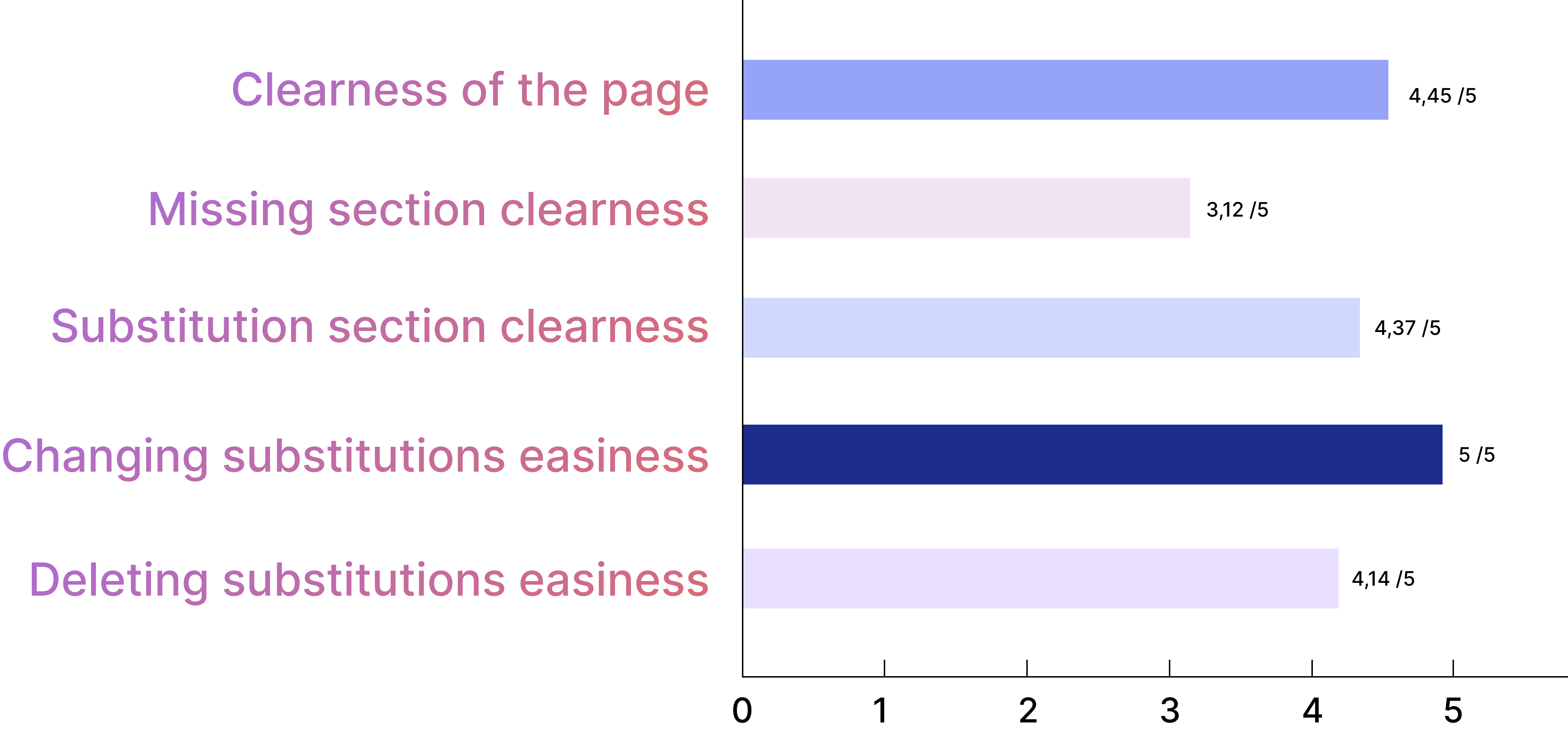
Key takeaways
- Participants who had previous experience with substitutions said they those were overall negative, and tend to opt out of substitutions if they can.
- Although the design was clear to most participants, 2/8 had an overall negative and 2/8 had a mixed experience with it.
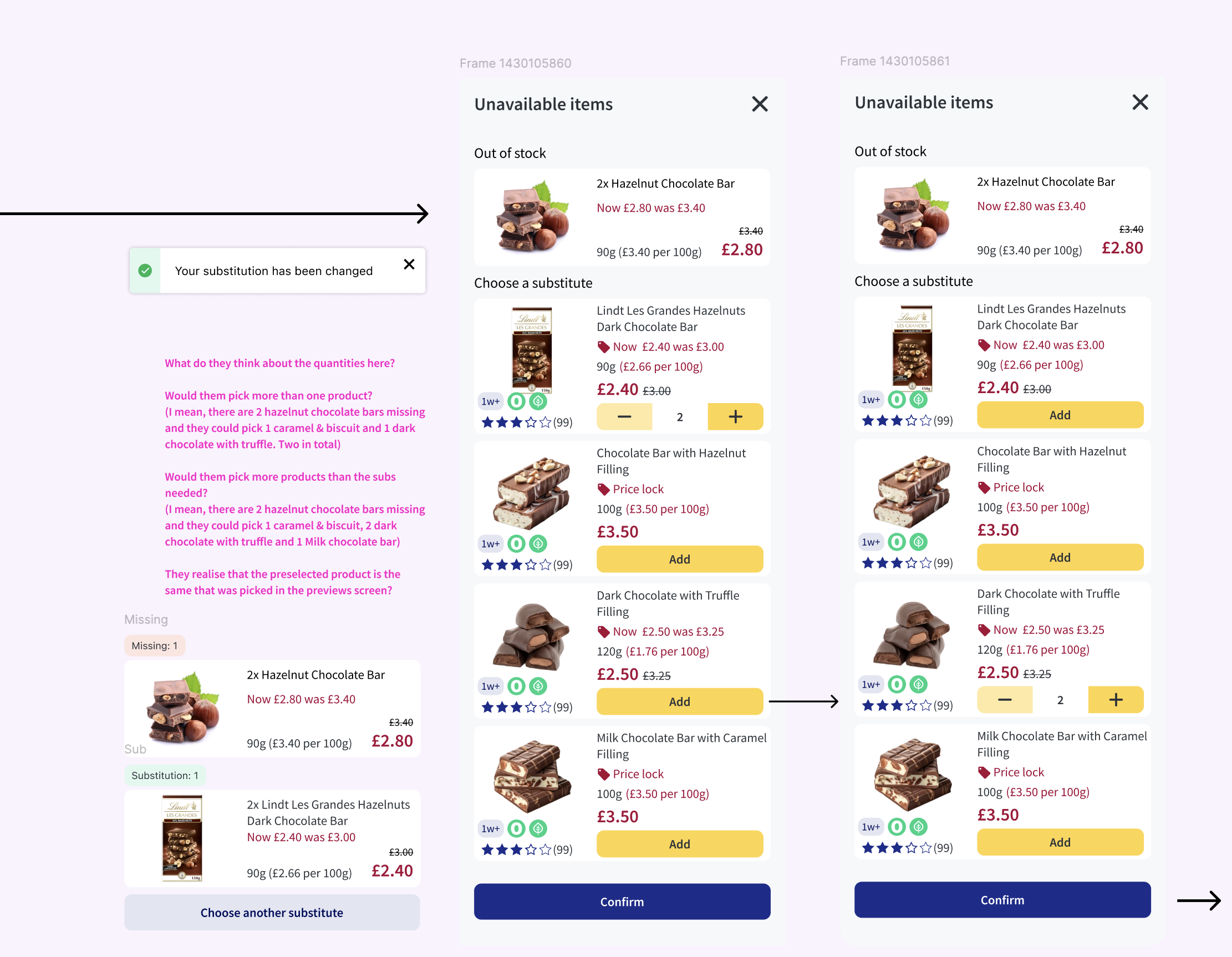
- The ‘Missing section’ was confusing to most participants, mostly due to the term ‘missing’ and the lack of Call-To-Action on that section.
- Most participants understood that they would have to search for alternatives for missing items themselves. But most didn’t understand correctly how to do that – and once we explained the flow to them, they found it ‘long winded’.
- Most participants understood that they would get the substitution suggested if they don’t take any action to change it in their basket.
- Most participants correctly chose another substitution amongst the ones offered.
When offered other substitutions options, most participants expected to be able to add different quantities of those options using the +/- on FOP – and were frustrated when they learned they couldn’t.
Test learnings
Missing section
Most of them think that missing items will no be delivered or substituted but, half of participants expressed confusion about the term «missing,» with some suggesting alternatives like «out of stock» or «unavailable.»
Some (3/8) users found it unclear what action to take regarding missing items. They expected a clear path to replace or remove these items, similar to the «Substitutions» section.
There was uncertainty about whether missing items were automatically removed from their basket and no reassurance that they’d not be charged for them for around half of participants.
Finding replacements for the missing items
6/8 participants would like to be able to look for alternatives and select a sub for their «missing» items, directly from the «missing» section.
All participants described how they would edit order and/or search for products to replace the «missing» items.
5/8 described that editing their order is the first thing they would try.
However, 3/8 described that they would try clicking on the product cards first and only when that did not work, did they suggest editing their order.
Most participants (5/8) felt that having to edit was inconvient but overall were fine with it, others felt that this was too slow (3/8)
Don’t want any substitutions and want to delete from basket
Most participants (5/8) expressed a preference for deleting items directly from the substitution page, rather than navigating to an «edit order» section.
Although some participants did find editing the order easy and expected.
Design principles
Based on research insights and operational constraints, I defined the following principles to guide design decisions throughout the project.
1. Enable control early, in context
Give customers the ability to influence substitutions before fulfilment begins, directly within their basket.
- Research showed that lack of control was the primary source of frustration.
- Users wanted to resolve substitutions where the issue appeared, not through secondary flows.
- Early control reduces anxiety and increases perceived fairness.
2. One place, one mental model
Use a consistent interaction model for both substitutions and unavailable items.
- The term “Missing” created uncertainty around status and next steps.
- Users expected similar actions (replace, remove, search) across all unavailable items.
- Consistency reduced cognitive load and confusion.
3. Smart defaults, simple overrides
Provide sensible default substitutions, while making changes fast and effortless.
- Most users were comfortable with defaults if they trusted the system.
- Power users wanted control, but not at the cost of long flows.
- Defaults reduce effort; overrides preserve autonomy.
4. Minimise navigation, maximise action
Allow users to take action directly on items without forcing them into separate flows.
- Navigating to Edit order was perceived as slow or disruptive.
- Users instinctively tried to interact with product cards first.
- Direct actions increased speed and confidence.
5. Transparency over perfection
Clearly communicate availability, outcomes, and constraints to build trust.
- Clear communication reduced frustration even when outcomes weren’t ideal.
- Users were unsure whether missing items would be charged.
- Uncertainty about “what happens if I do nothing” caused anxiety.
Ideation & exploración
Exploration 1
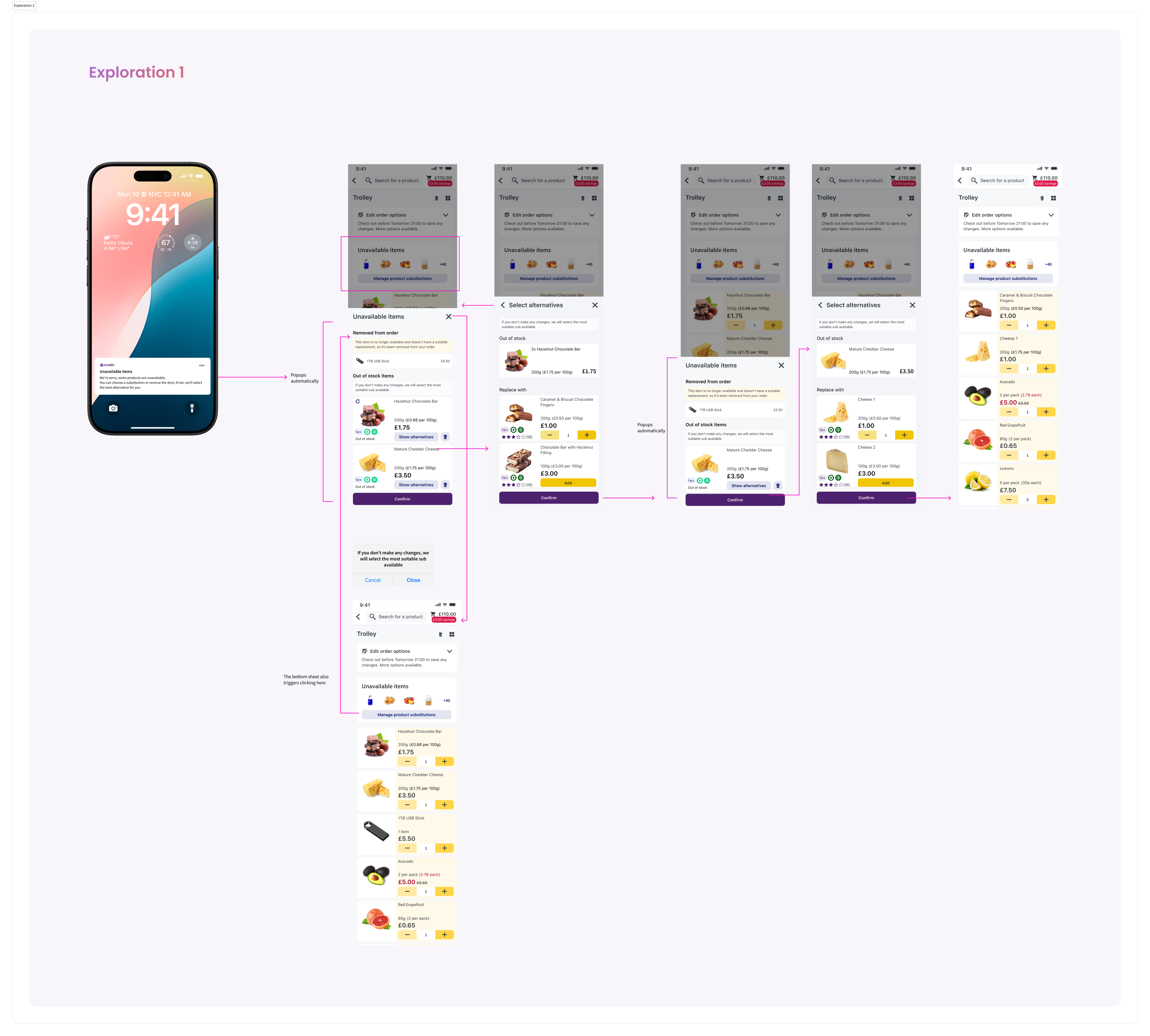
In this exploration, the bottom sheet is automatically triggered when the user clicks on the notification informing them about unavailable items. Users can also access it manually by clicking on “Manage product substitutions” in the trolley card.
Within the bottom sheet, users can review unavailable products and select substitute items one by one. They can navigate back to the previous page at any point during the flow.
When the user presses Continue, the experience automatically moves to the next unavailable product. If the user closes the bottom sheet before completing the flow, the changes made to the current product are saved, but no changes are applied to the remaining items.
Once confirmed, the selected substitute products appear in the cart in edit mode, replacing the original unavailable items.
Exploration 2
Exploration 3
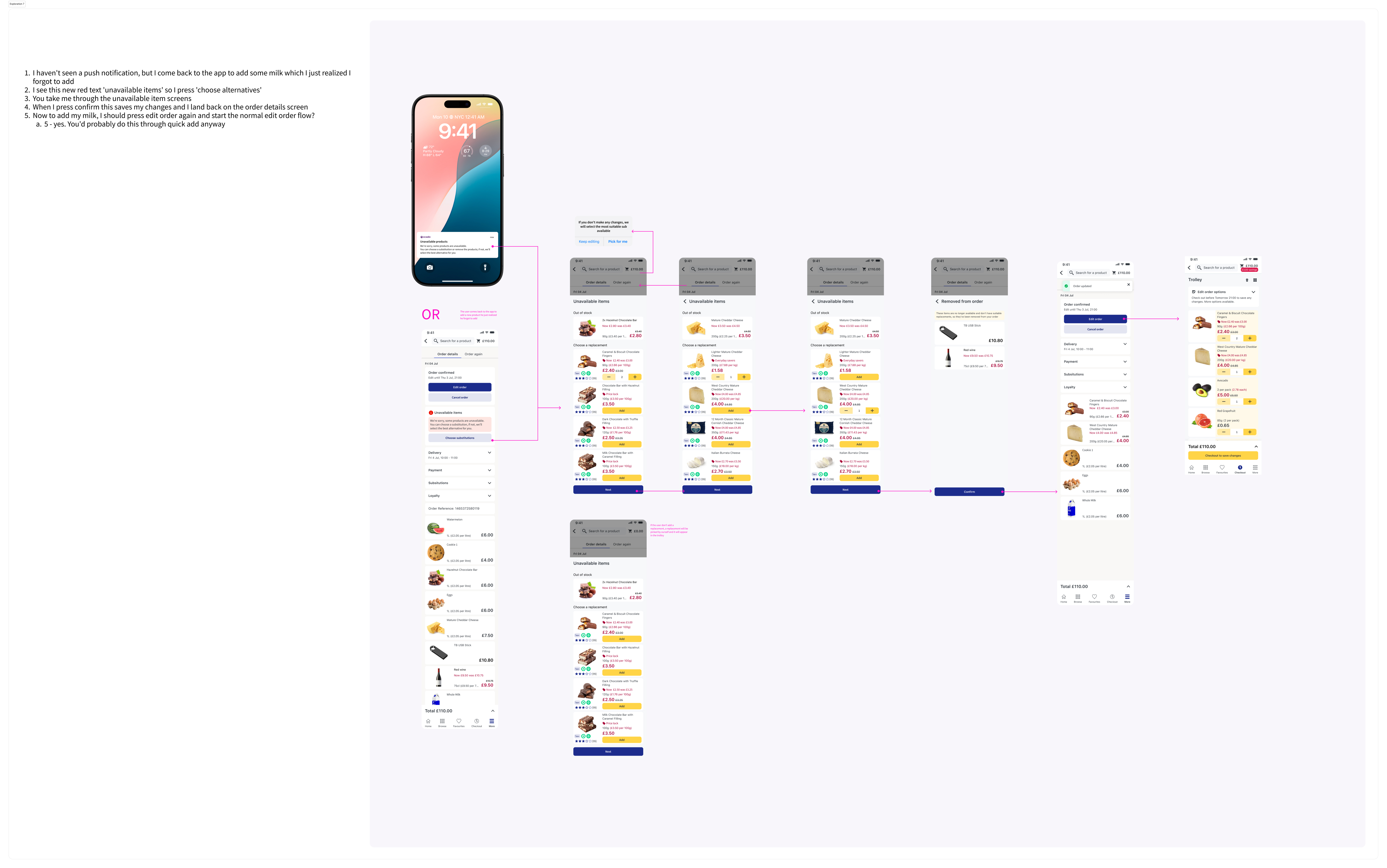
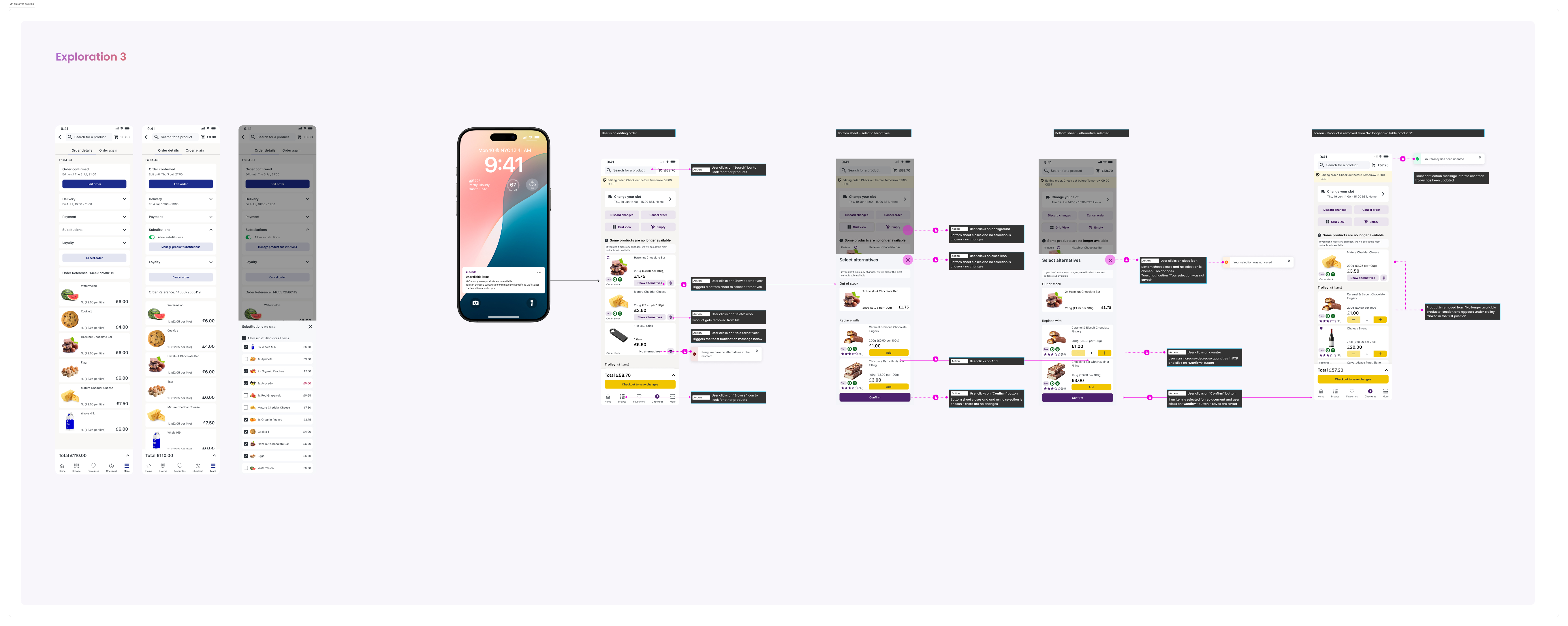
In this second exploration, we decided to move where substitutions live from the Trolley to the Order Details page, further down the funnel. This allows Fulfilment to verify which products may be out of stock after payment has been completed.
By moving this step later in the journey, we can provide more accurate results regarding product availability.
In this exploration, the bottom sheet is triggered by tapping “Manage substitutions.”
Final design
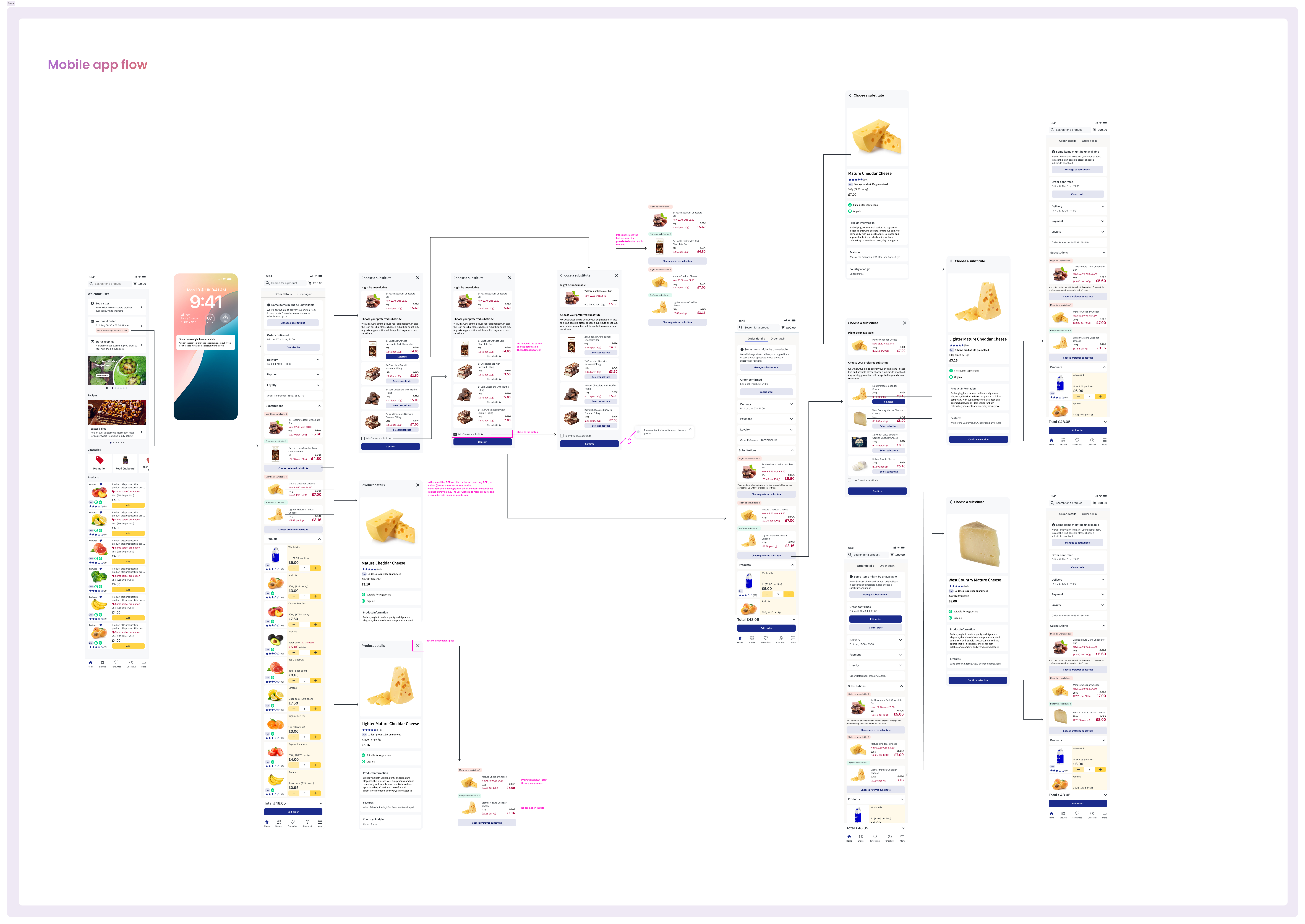
For the final design, we decided to enable the substitutions flow after payment, within the Order Details page.
There is an anchor button that takes users directly to the substitutions section, where they can see the missing product and the substitute we have selected for them. If the user does not make any changes, this will be the product they receive at home. They can still reject it at the door, and the amount paid will be refunded. The refund will be reflected in their order.
Users can tap the “Change substitutions” button to view the list of options that the retailer has configured as possible substitutes for that product. From there, they can select a different product or reject the substitution entirely.
Users can also access a simplified product detail page that we created specifically for this flow. It does not include CTAs in order to reduce drop-off, but it was important to display ingredients and key product information.
Once users accept a substitute, they do not need to go through the payment gateway again. We will automatically match any promotions they previously selected.
This approach works well because data shows that there are typically only two, or at most three, substituted products per order, making the process short and manageable.
Check the final design here
 Patricia Pérez